What is an Email API and how does it send email?
By MailChannels | 18 minute read
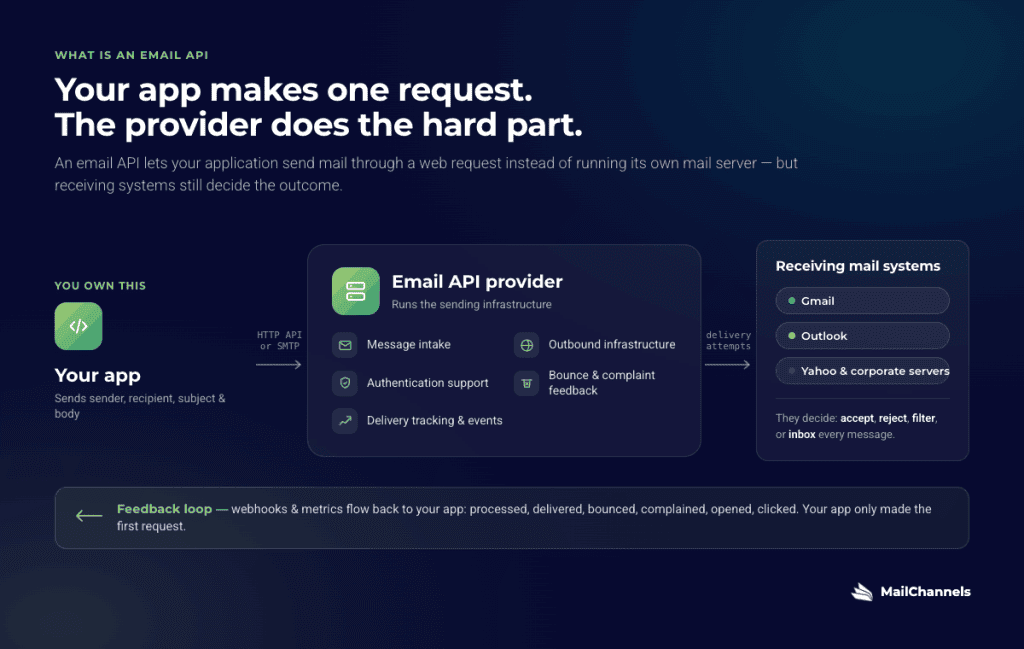
An email API is a service that lets your application send email through a web request instead of running its own mail server. Your app sends the message details to an email provider. The provider handles message intake, outbound infrastructure, authentication support, bounce and complaint feedback, and delivery tracking.
That does not mean the provider controls every outcome. Receiving mail systems like Gmail, Outlook, Yahoo, and corporate mail servers still decide whether to accept, reject, filter, or inbox each message. A good email API gives your app the infrastructure and feedback loops it needs to send responsibly, troubleshoot problems, and improve delivery over time.
TL;DR
An email API lets your app send email by making a request to an outside service.
The provider handles the hard infrastructure: message processing, outbound delivery attempts, authentication support, bounces, complaints, tracking, and reputation management.
You can usually connect through a modern HTTP API or through SMTP, the long-standing email protocol used by many older applications. Both can work.
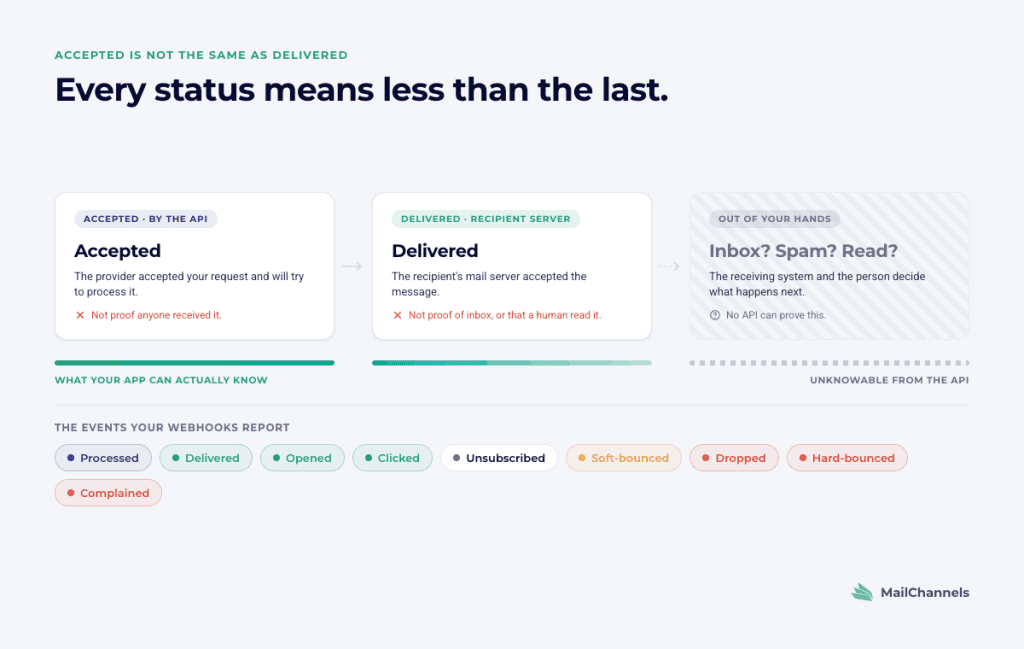
“Accepted” by the API is not the same as “delivered.” “Delivered” usually means the recipient’s mail server accepted the message. It does not prove inbox placement or human attention.
Webhooks and metrics tell your app what happened after submission: processed, delivered, bounced, dropped, opened, clicked, unsubscribed, or complained.
If your platform lets many customers or users send email through it, you need more than a basic email API. You need tenant-level controls so one bad or compromised sender does not damage everyone else.
Quick definitions
Email API. A service your app calls to send email through someone else’s email infrastructure.
SMTP. The long-standing protocol that email systems use to send mail. SMTP is still widely used and is often the easiest option for older software, plugins, and hosting environments.
Webhook. A notification the email provider sends back to your app when something happens to a message.
Bounce. An email that could not be delivered. A hard bounce usually means a permanent problem, such as an invalid address. A soft bounce usually means a temporary problem, such as a full mailbox or a receiving server that is temporarily unavailable.
Complaint. When a recipient marks your email as spam. Complaints are one of the fastest ways to damage sender reputation.
SPF, DKIM, and DMARC. DNS-based email authentication tools. SPF authorizes sending systems for a domain. DKIM adds a cryptographic signature to messages. DMARC tells receivers how to evaluate and handle mail that fails authentication or alignment checks.
Domain Lockdown. A MailChannels DNS-based security feature that tells MailChannels which accounts or sender identities are allowed to send mail from a domain.
Sender reputation. The collection of signals mailbox providers use to judge mail from your domains, IPs, and authenticated sending identities. Complaints, bounces, authentication, content, sending patterns, and shared-infrastructure behavior can all affect it.
Suppression list. A list of recipients your app should not email again, often because they bounced, unsubscribed, or complained.
Multi-tenant. A platform where many customers, users, sites, agents, or applications send email through the same product. Each customer is a tenant.
Why sending email is harder than it sounds
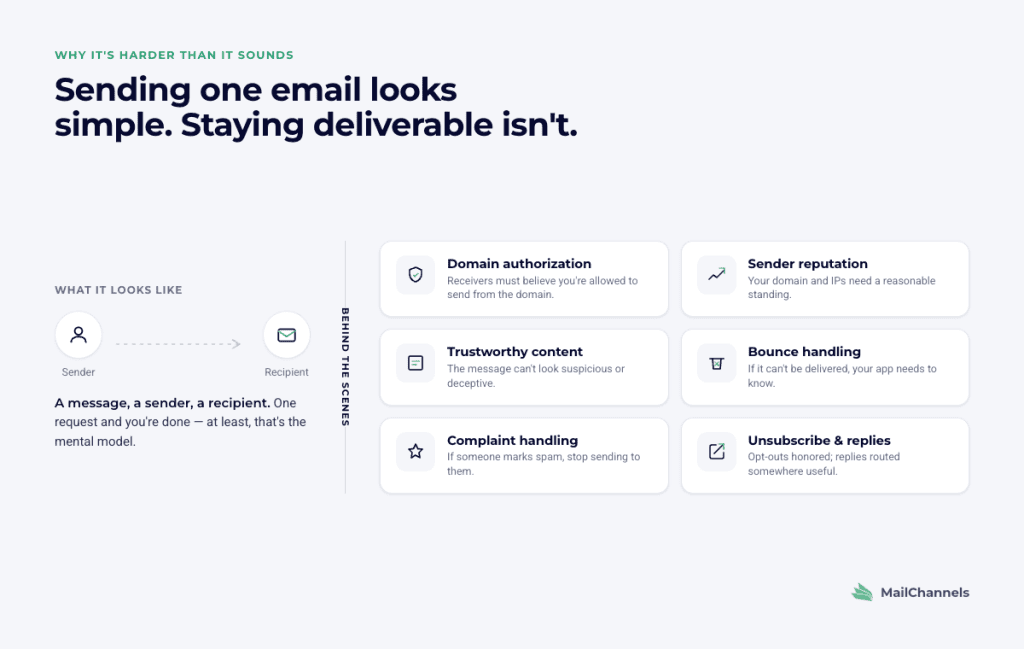
Sending one email seems simple. You have a message, a sender, and a recipient. But behind the scenes, many things have to go right.
The receiving service has to believe you are allowed to send from the domain in the message. Your domain and sending infrastructure need a reasonable reputation. Your message has to avoid looking suspicious or deceptive. If the email bounces, your app needs to know. If someone marks the email as spam, your app should stop sending to that person. If the message is non-transactional, you may need unsubscribe handling. If the recipient replies, the reply needs to go somewhere useful.
An email API handles many of these operational jobs for you. Your app submits the message, and the provider manages the sending infrastructure, delivery attempts, tracking, and feedback events.
But an email API cannot guarantee inbox placement. It cannot force Gmail or Outlook to accept a message. It cannot make recipients read your email. What it can do is help you send authenticated mail, receive accurate feedback, respond to delivery problems, and avoid preventable reputation damage.
How it works in practice
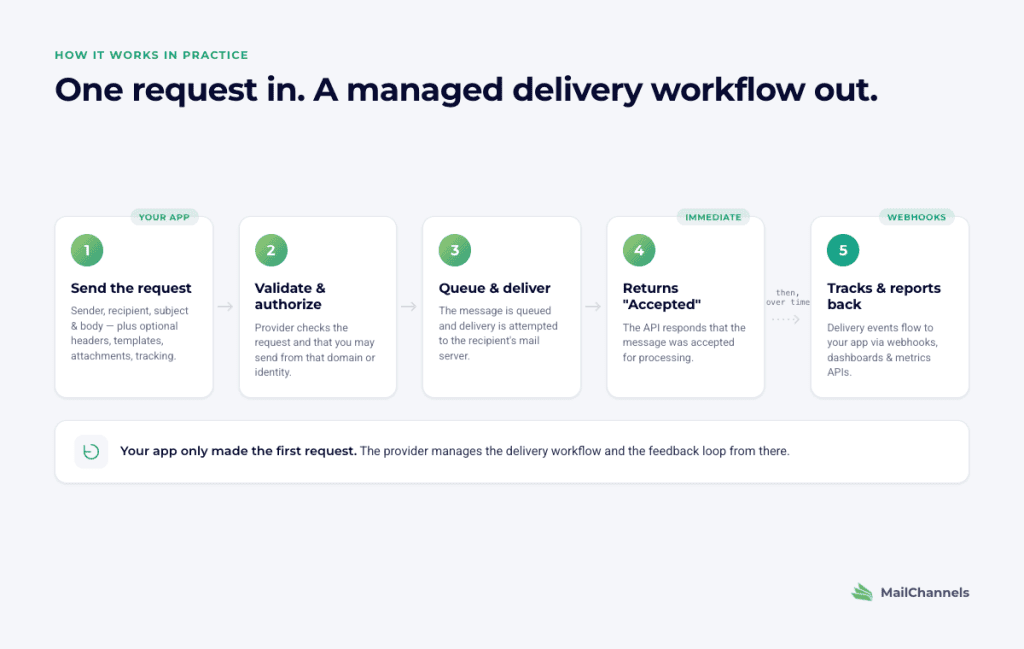
When your app sends an email through an API, the process usually looks like this:
- Your app sends a request to the email provider with the sender, recipient, subject line, message body, and optional settings such as headers, templates, attachments, or tracking.
- The provider checks that the request is valid and that you are allowed to send from the domain or sender identity.
- The provider queues the message and attempts delivery to the recipient’s mail server.
- The provider returns an API response saying the message was accepted for processing.
- The provider tracks what happens next and sends events back to your app through webhooks or makes them available through dashboards and metrics APIs.
Your app only had to make the first request. The provider manages the delivery workflow and the feedback loop.
With MailChannels Email API, for example, your app sends a JSON request to the /send endpoint. MailChannels supports plain text and HTML email, custom headers, attachments, open and click tracking, bounces, DKIM, templates, and other API features. (MailChannels API Documentation)
Accepted is not the same as delivered
This trips up a lot of developers.
When an email API says a message was accepted, it usually means the provider accepted the request and will try to process or deliver the message. It does not mean the recipient received it.
When an event says delivered, it usually means the recipient’s mail server accepted the message. It still does not prove that the message landed in the inbox, avoided the spam folder, or was read by a human.
A good app sets up webhooks from the start. Without them, you are sending email blind.
Typical events include:
Processed. The provider received the message and began processing it.
Delivered. The recipient’s mail server accepted the email.
Dropped. The provider could not process or send the message.
Hard-bounced. The recipient’s server permanently rejected the email.
Soft-bounced. Delivery failed temporarily and may be retried.
Unsubscribed. The recipient used an unsubscribe mechanism.
Opened. The recipient opened the email, if open tracking is enabled.
Clicked. The recipient clicked a tracked link, if click tracking is enabled.
Complained. The recipient filed a spam complaint.
MailChannels delivery events use this kind of model: messages are queued after /send, and webhooks can report delivery attempts, bounces, opens, clicks, unsubscribes, complaints, and related events. In MailChannels’ docs, delivered means the recipient’s server accepted the email. (MailChannels API Documentation)
API vs SMTP: which one should you use?

Many email providers offer two ways to send mail: an HTTP API and SMTP. Some providers specialize in one or the other.
| Feature | Email API | SMTP |
| How it works | Modern web request | Long-standing email protocol |
| Best for | New apps, SaaS products, backend services, modern frameworks | Older software, hosting environments, CMS plugins, WordPress, legacy tools |
| Setup speed | Fast if your app can make HTTP requests | Fast if your software already supports SMTP |
| Tracking and webhooks | Usually easier to connect directly | Often available, but may require more setup |
| Templates | Often available, depending on provider | Usually handled by your app or plugin |
| Good fit if you already use SMTP | Maybe, if you want tighter API integration | Yes, especially if your software already supports it |
Both paths can send email. The better choice depends on what your app already supports and how much control you need.
Use an API when you are building a modern application and want direct access to templates, metadata, event tracking, metrics, and programmatic controls.
Use SMTP when your application already speaks SMTP, when you are connecting older software, or when you want to improve delivery without rewriting how the application sends mail.
Why your domain needs to prove who it is
Before mailbox providers trust your messages, your domain needs to authenticate them.
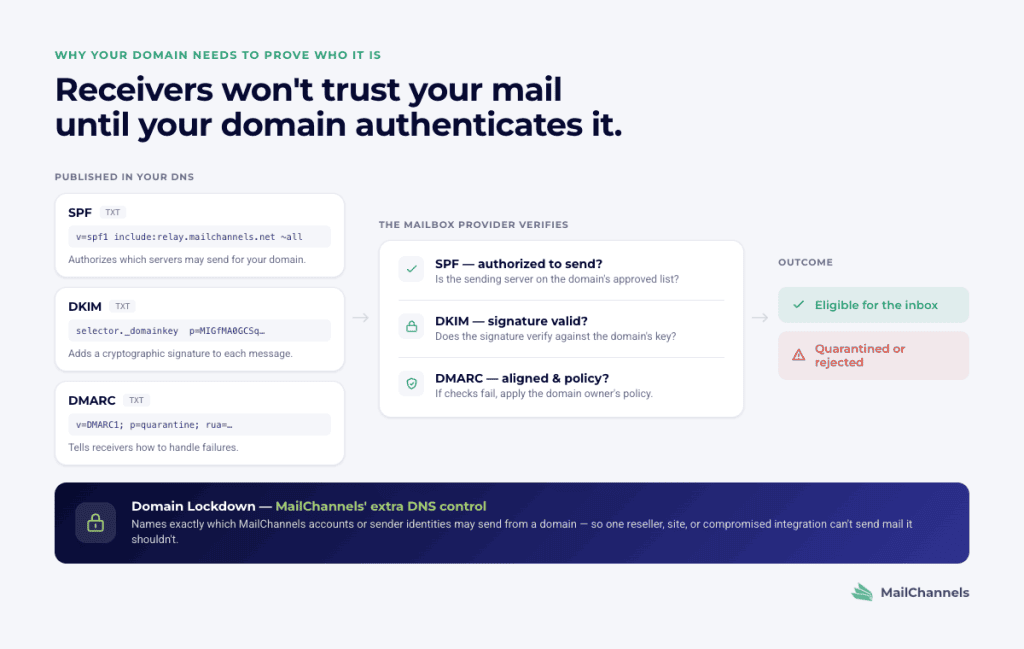
That usually means setting up SPF, DKIM, and DMARC.
SPF tells receivers which servers are authorized to send mail for your domain.
DKIM adds a digital signature so receivers can verify that a message was signed by a domain you control.
DMARC tells receivers how to handle messages that fail authentication or alignment checks.
These settings do not magically guarantee inbox placement, but they are now baseline requirements for serious email sending. Google requires all senders to Gmail accounts to use SPF or DKIM, and senders of more than 5,000 messages per day to Gmail accounts must use SPF, DKIM, and DMARC, keep spam rates below Google’s threshold, and support one-click unsubscribe for marketing and subscribed messages. (Google Help)
Most email API providers walk you through DNS setup. It can take only a few minutes to add the records, though DNS changes sometimes take time to propagate.
MailChannels adds another useful control called Domain Lockdown. It is a DNS-based rule that tells MailChannels which MailChannels accounts or sender identities are allowed to send from a domain. That matters when many senders share infrastructure, because you do not want one account, reseller, site, or compromised integration sending mail for a domain it should not control. MailChannels requires a valid API key, a Domain Lockdown record for each sending domain, and an updated SPF record before sending through the Email API. (MailChannels API Documentation)
MailChannels also provides a domain-check endpoint that can validate DKIM, SPF, and Domain Lockdown status, which is useful when you are onboarding customers or debugging DNS. (MailChannels API Documentation)
The harder problem: when your customers send email through your app
Everything above works well when one company sends its own email.
It gets harder when your platform lets other people send email through it.
Examples include:
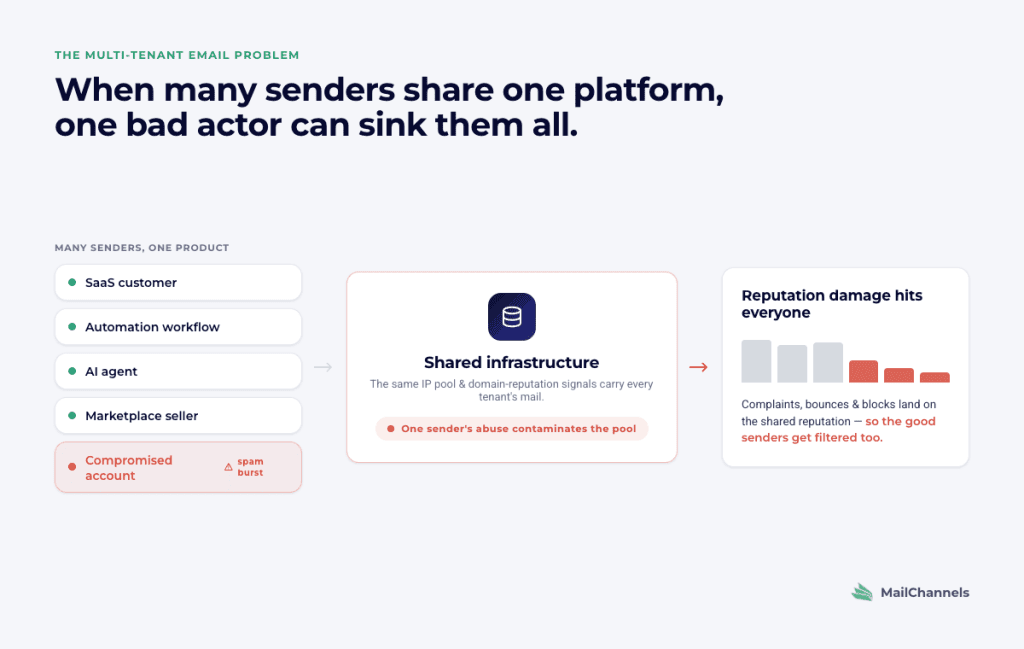
- A SaaS app where each customer sends emails to their own users.
- An automation tool where customer workflows trigger email.
- An AI agent that sends email on a user’s behalf.
- A marketplace where sellers message buyers.
- A web hosting company whose customers each run their own websites.
- An agency or reseller platform that manages email for many client domains.
In all of these cases, many different senders are using the same product or infrastructure. That creates a new risk: one careless, abusive, or compromised sender can hurt the reputation of others.
This is the multi-tenant email problem.
A basic email API may send mail reliably for one company. But a multi-tenant platform needs more:
Separate sending identities. Each customer, tenant, app, agent, or domain should be distinguishable.
Tenant-level limits. One customer should not be able to burn through everyone’s quota or send a damaging volume spike.
Fast abuse detection. The platform needs to spot suspicious sending, high bounces, complaints, compromised accounts, and sudden changes.
A way to suspend one sender. You should be able to stop a bad sender without shutting down email for every other customer.
Suppression handling. The system should stop sending to addresses that bounced, unsubscribed, or complained.
Useful metrics. Aggregate delivery stats are not enough. You need to know which sender, campaign, subaccount, workflow, or customer is causing trouble.
Secure webhooks. Delivery events should be specific, verifiable, and safe to process.
How MailChannels helps with multi-tenant email
MailChannels was built around a difficult version of this problem: helping hosting providers send email safely for large numbers of end users. Hosting environments are hard because customers are numerous, domains vary widely, and some sites or accounts eventually get compromised.
That same problem now shows up in SaaS platforms, automation tools, marketplaces, and AI-agent products. Many different senders use one platform, and the platform needs to protect good senders from bad ones.
MailChannels Email API includes several controls that are especially relevant for multi-tenant sending.
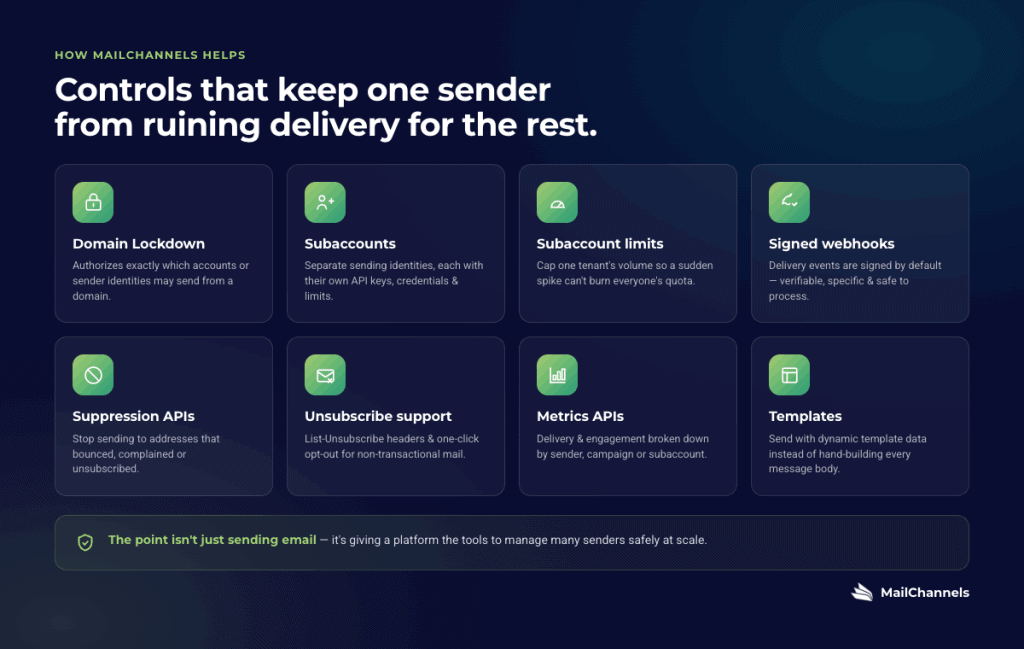
Domain Lockdown helps prevent unauthorized MailChannels accounts or sender identities from sending from a domain. It can authorize an account, a subaccount, an exact sender ID, or a controlled sender-ID pattern. (MailChannels API Documentation)
Subaccounts let eligible MailChannels customers create separate sending identities under a main account. Subaccounts can have their own API keys, SMTP credentials, and sending limits, which is useful when you need to isolate customers, departments, or tenants. MailChannels notes that subaccounts are available on subscriptions with at least 100,000 monthly sends. (MailChannels API Documentation)
Subaccount limits help protect the parent account from excessive sending by one subaccount. If a customer or tenant suddenly sends too much, limits can help contain the impact. (MailChannels API Documentation)
Signed webhooks help your app trust delivery events. MailChannels signs webhooks by default and recommends verifying the message signature, checking the customer handle, processing events asynchronously, and storing raw event data. (MailChannels API Documentation)
Suppression APIs let you create suppression entries so your app can avoid sending to recipients that should no longer receive mail. Parent accounts can create suppression entries across associated subaccounts. (MailChannels API Documentation)
Unsubscribe support helps with non-transactional messages. MailChannels supports unsubscribe links and List-Unsubscribe headers, including automatic List-Unsubscribe and List-Unsubscribe-Post headers when transactional is set to false and the message meets the documented requirements. (MailChannels API Documentation)
Metrics APIs help you monitor performance, engagement, recipient behavior, volume, and sender-level performance. Sender metrics can be grouped by campaigns or subaccounts, which is important when you need to identify large senders, delivery issues, high rejection rates, or accounts hitting limits. (MailChannels API Documentation)
Templates let developers send customized messages using template data rather than building every message body manually. MailChannels currently documents Mustache templates with dynamic_template_data and a dry-run option for previewing rendered messages. (MailChannels API Documentation)
The point is not just that MailChannels can send email. The point is that it gives platforms tools to manage many senders safely.
How to pick the right email API
When comparing email APIs, ask questions that go beyond “Can it send a message?”
How easy is it to set up? Can a developer send a test email quickly? Are the API examples clear? Does the provider support your preferred language or framework?
How does domain authentication work? Does the provider guide you through SPF, DKIM, and DMARC? Can you test whether DNS is configured correctly? Does it offer extra controls, such as Domain Lockdown, for authorizing who can send from a domain?
What exactly do the events mean? Does “accepted” mean accepted for processing? Does “delivered” mean recipient-server acceptance? Does the provider clearly distinguish processed, delivered, dropped, hard-bounced, soft-bounced, unsubscribed, opened, clicked, and complained events?
Are webhooks secure? Are they signed? Can you validate them? Can you handle retries, batching, and duplicate events safely?
Can you isolate senders? If one customer sends spam or gets compromised, can you identify and stop that sender without disrupting everyone else?
Does it support tenant-level controls? Look for subaccounts, separate credentials, sender-level metrics, per-tenant limits, and suppression handling.
How good are the metrics? Can you see delivery, bounces, complaints, opens, clicks, unsubscribes, volume, and sender-level performance? Can you break the data down by customer, campaign, workflow, subaccount, or domain?
What happens after a hard bounce or complaint? Can your app automatically stop sending to that recipient? Can suppressions apply at the account or subaccount level?
Does it support non-transactional requirements? If you send subscribed or marketing messages, can the API support one-click unsubscribe and List-Unsubscribe headers where required?
Does it support your current sending path? If your software already uses SMTP, can you start there? If you are building a modern app, does the HTTP API give you the control you need?
Is the pricing predictable as you grow? Email volume often grows with product usage. Make sure the plan fits your expected send volume and tenant model.
Who else uses it? A provider used by platforms with complex sending patterns has usually solved problems you may not have hit yet.
Frequently asked questions
What is an email API in simple terms?
An email API is a service your app calls to send email. Your app sends a request with the message details, and the provider handles the sending infrastructure, delivery attempts, tracking, and feedback events.
Is an email API different from SMTP?
Yes. An email API usually uses modern HTTP requests. SMTP is the long-standing email protocol used by mail servers and many older applications. Both can send email. APIs are often easier for modern apps that want tracking, templates, metadata, and programmatic controls. SMTP is often easier for existing tools that already support it.
Can I use an email API with WordPress?
Often, yes, but the easiest path is usually SMTP. WordPress and many plugins already support SMTP, so you can often connect through SMTP without changing application code. Some providers also offer plugins or API-based integrations.
How long does it take to set up an email API?
A basic test email can often be sent quickly once you have an account and API key. A production setup takes longer because you should configure domain authentication, test DNS, set up webhooks, handle bounces and complaints, and verify your sending flows.
What does “accepted” mean?
“Accepted” means the provider accepted your request for processing. It does not mean the recipient’s server accepted the message, and it does not mean the message reached the inbox.
What does “delivered” mean?
“Delivered” usually means the recipient’s mail server accepted the message. It does not prove inbox placement, spam-folder avoidance, or that a person read the message.
What happens if an email bounces?
The provider should send a webhook or make an event available through its API or dashboard. Your app should distinguish hard bounces from soft bounces. For permanent failures, your app should stop sending to that recipient or add the address to a suppression list.
Why do email APIs care so much about spam complaints?
Complaints are a strong negative signal. If recipients mark your messages as spam, mailbox providers may start filtering or blocking future mail from your domain, IP, or sending identity. For platforms, complaints from one tenant can also create reputation risk for other tenants if sending is not isolated properly.
Do I need an email API if I only send a few emails?
For very low volume, you might be fine with a simple SMTP service or a built-in email tool. Once you send automated product email, transactional email, user notifications, or customer-triggered messages, an email API gives you better tracking, event handling, and operational control.
What is the multi-tenant email problem?
It is the problem that happens when many different customers, users, sites, agents, or applications send email through the same platform. One bad or compromised sender can damage shared reputation, trigger complaints, cause blocks, or disrupt delivery for everyone else. Multi-tenant platforms need sender isolation, monitoring, limits, suppression handling, and a way to stop one bad sender without stopping all email.
Who is MailChannels for?
MailChannels is built for platforms where many senders need to send email safely. That includes SaaS apps, automation tools, AI-agent products, hosting companies, agencies, resellers, and other multi-tenant platforms.
MailChannels is not a cold-outreach platform. It is also not primarily a bulk newsletter campaign tool. If you send non-transactional or subscribed messages, pay close attention to consent, unsubscribe, authentication, suppression, and mailbox-provider requirements.
What is the difference between transactional email and marketing email?
Transactional email is sent in response to something a user did or needs to know, such as a password reset, receipt, account alert, login code, or order confirmation.
Marketing email is promotional or subscription-based, such as newsletters, product announcements, lifecycle campaigns, or sales offers.
Many email APIs can send both, but the compliance requirements are different. Marketing and subscribed messages need clear consent, easy unsubscribe, and careful list hygiene. Transactional messages should stay focused on the transaction or service event the user expects.
What should I look for if my app sends email on behalf of users or AI agents?
Look for an API that supports sender identity controls, domain authentication, per-sender metrics, tenant-level limits, suppressions, secure webhooks, and a way to stop a single sender quickly. For AI agents in particular, make sure you can trace which user, agent, workflow, or integration caused each message to be sent.
Bottom line
An email API is not just a way to send messages. It is the infrastructure, feedback loop, and control plane for application email.
For a simple app, the most important things are setup speed, authentication, bounce handling, and clear webhooks.
For a platform, the stakes are higher. You need to know who is sending, what they are sending, how recipients are reacting, and whether one sender is putting others at risk.
That is where multi-tenant email controls matter. Features like Domain Lockdown, subaccounts, sender-level metrics, suppression management, unsubscribe support, and signed webhooks help a platform send email safely at scale without letting one bad sender ruin delivery for everyone else.