Introducing Notification Center
By Desmond Liao | 3 minute read

Notification Center pulls together all the intelligence about your email infrastructure and makes it available in one place. It tells you important information, such as who sends the most email by volume, who are the biggest spammers, and who is having deliverability issues on your network.
Access the feature
You will find the Notification Center under the Activity section of the MailChannels console. (The Top Senders reports are now located under the Activity section.) Use the top menu to access all the Notification Center information. If you click on “Notifications” from within the Notification Center, you can access the same information from the sidebar menu.
Monitors
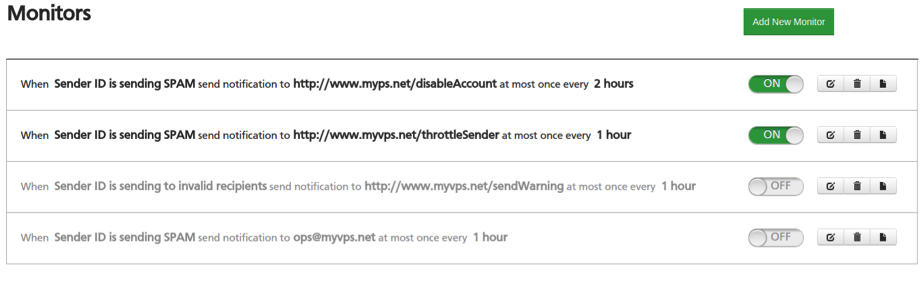
The Monitors section lets you configure settings to be alerted about specific events. Alerts can be received by email or by webhook, and you can throttle the frequency to limit how often you receive the same alert.
Alerts
Regardless of how you decide to receive an alert, the following information is available:
| timestamp | The time at which the alert was generated. |
| originator | The token representing the originator of the alert. |
| originator_type | The type of originator token; one of: sender_id, ip, enevelope_sender. |
| sender_id | The sender_id associated with the alert. |
| ip | The IP address asssociated with the alert. |
| envelope_sender | The envelope sender address associated with the alert. |
| transaction_id | The transaction ID associated with the alert. |
| condition_name | A token representing the condition that triggered this alert. |
| condition_description | A human friendly description of the condition that triggered this alert. |
The email target sends a nicely formatted message to the specified address, containing information about the type of alert and the sender who triggered it. The same information is included in a JSON attachment that could easily be processed by script in order to automate alert handling.
Webhook
The webhook target sends an HTTP POST request to the specified URI. The body of the request is a JSON formatted message containing information about the type of alert and the sender who triggered it.
Alerts Feed
The Alerts Feed provides a chronological view of significant events in your email infrastructure. Alerts are color-coded by condition for easy identification. You can search within the feed by Sender ID, IP Address, Envelope Sender or Domain, and filter by condition. You can also automate your alert handling by polling for new alerts with a JSON representation of the Alerts Feed that we provide.

Reap the benefits
If you need timely insights about abuse or deliverability issues in your email infrastructure, Notification Center provides real-time alerts that integrate easily with your abuse desk workflow. You’ll never miss an alert again with the archived alert feed available in your customer console.